 Windows
 Mac OS
AI at your fingertips in 3 seconds
Texttify is the invisible AI layer on your desktop. It works everywhere you type, without ever leaving your current app.

01
Select any text
Highlight text in any app — browser, Google Docs, VS Code, email, anywhere.

02
Press Ctrl + Shift + Space
A sleek popup appears instantly right where you’re working. No tab switching.

03
Pick an AI action
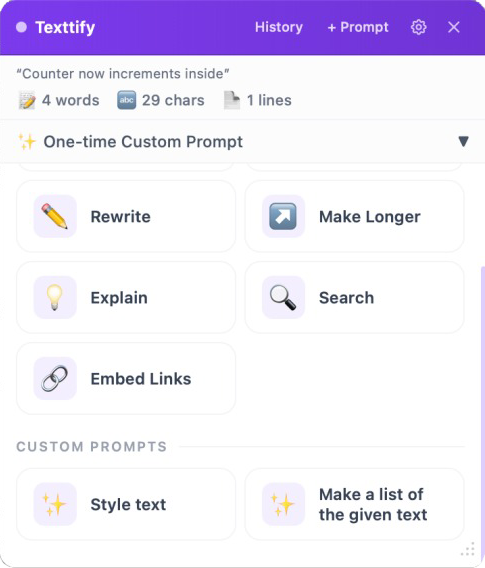
Rewrite, translate, fix grammar, summarize, expand — results appear in seconds.
Texttify vs, the old way
Work faster, without interruptions.
Instant results
AI responses appear in under 2 seconds. No loading screens, no waiting.
Works everywhere
Browser, Word, Google Docs, Slack, VS Code, emails — any text field on your desktop.
Smart prompts
Built-in actions for rewriting, grammar fixes, translation, tone adjustment, and more.
One shortcut
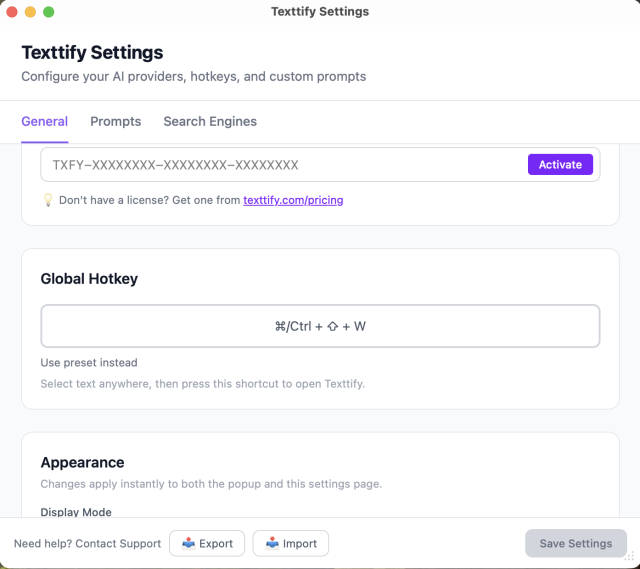
Ctrl+Shift+Space is all you need. Muscle memory kicks in after day one.
Universal text capture
Automatically grabs your selected text — no manual copy-paste needed.
Custom prompts
Create your own AI commands tailored to your specific workflow and needs.
Start free, Upgrade when you’re hooked.
Free
$0/ forever
Get started with core features
- 20 AI actions
- All Built-in prompts
- Works on Windows & macOS
Pro
$25/ month
Unlimited power for professionals
- Unlimited AI actions
- All built-in prompts
- Custom prompts
- Premium AI models
- Priority support
- Early access to new features
Pro +
$250/ year
Unlimited power for professionals
- Unlimited AI actions
- All built-in prompts
- Custom prompts
- Premium AI models
- Priority support
- Early access to new features
The popup that, changes everything
It seamlessly integrates with any application where you type, allowing you to enhance, rewrite, or refine text instantly without switching tabs or leaving your current workflow. Whether you’re writing emails, documents, messages, or code, Texttify works quietly in the background to help you write faster and more effectively—right where you are.
Text Selection > Ctrl+Shift+Space > Texttify Popup
Add your custom hotkey in the Texttify settings.
Stop leaving your work
to use AI.
Join thousands of professionals who brought AI to their fingertips. Download Texttify for free and never break your flow again.